Protecting your online accounts is more critical than ever. Two-factor authentication (2FA) has long been the frontline defense against cyber threats, but not all 2FA methods are created equal. While SMS-based 2FA is convenient, it comes with significant security risks that can leave your accounts vulnerable to hackers.
Upgrading to security keys physical devices designed to authenticate your identity offers a stronger, more reliable layer of protection. switching from SMS to security keys is not just a smart move it is essential for safeguarding your personal and professional data.
Why Two-Factor Authentication (2FA)
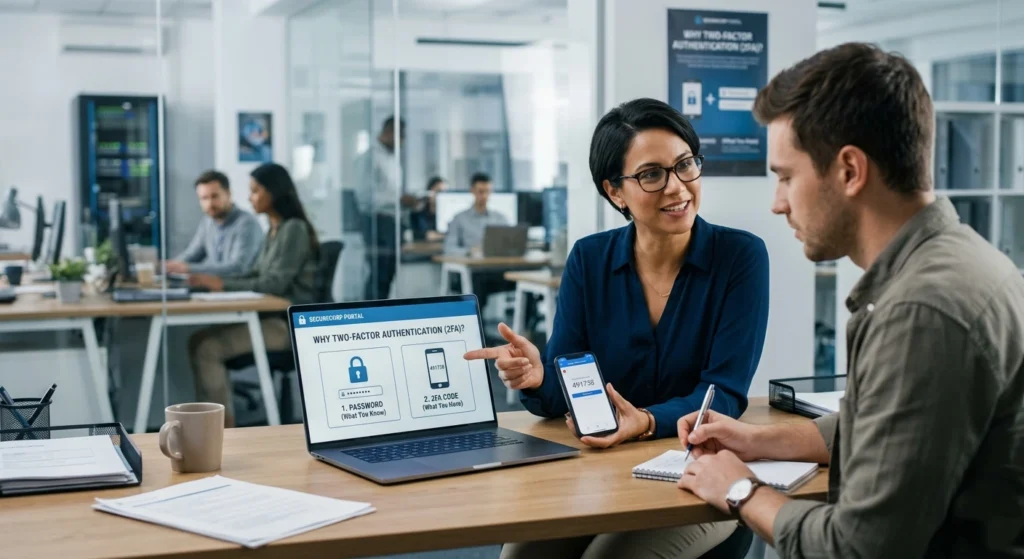
In today’s connected world, protecting online accounts is no longer optional it is essential. Passwords alone, even strong ones, are often not enough to safeguard sensitive data. This is where Two-Factor Authentication (2FA) plays a critical role. It adds an extra layer of verification, ensuring that access to your accounts requires more than just something you know.
At its core, 2FA combines two different authentication factors.
- Something you know (like a password or PIN)
- Something you have (like a phone or physical key)
- Sometimes even something you are (like biometric data such as a fingerprint)
This layered approach significantly reduces the chances of unauthorized access. Even if a password is exposed, the second factor acts as a strong barrier.
Why 2FA Matters More Than Ever
The digital landscape has evolved rapidly. People now store financial data, personal documents, business communications, and even identity-related information online. As a result, the consequences of weak account protection are far more serious.
Key reasons 2FA is essential.
- Passwords can be reused or guessed, especially if they are simple
- Many users rely on the same credentials across multiple platforms
- Data leaks from one platform can expose accounts elsewhere
- Automated systems can attempt login combinations at scale
Adding a second factor drastically reduces risk because it requires physical or device-based confirmation, not just knowledge.
The Limitations of Password-Only Security
Even complex passwords have limitations.
- They can be forgotten, leading users to create simpler alternatives
- People often reuse passwords across services
- Password managers help, but they are not universally adopted
2FA transforms security from a single checkpoint into a multi-step verification process, making unauthorized access significantly more difficult.
Different Types of 2FA Methods
There are several ways to implement 2FA, including.
- SMS-based codes
- Authenticator apps
- Email-based verification
- Hardware-based security keys
While all of these improve security compared to passwords alone, not all 2FA methods offer the same level of protection. This is why understanding their differences is crucial especially when choosing between SMS and security keys.
The Risks of Using SMS for 2FA
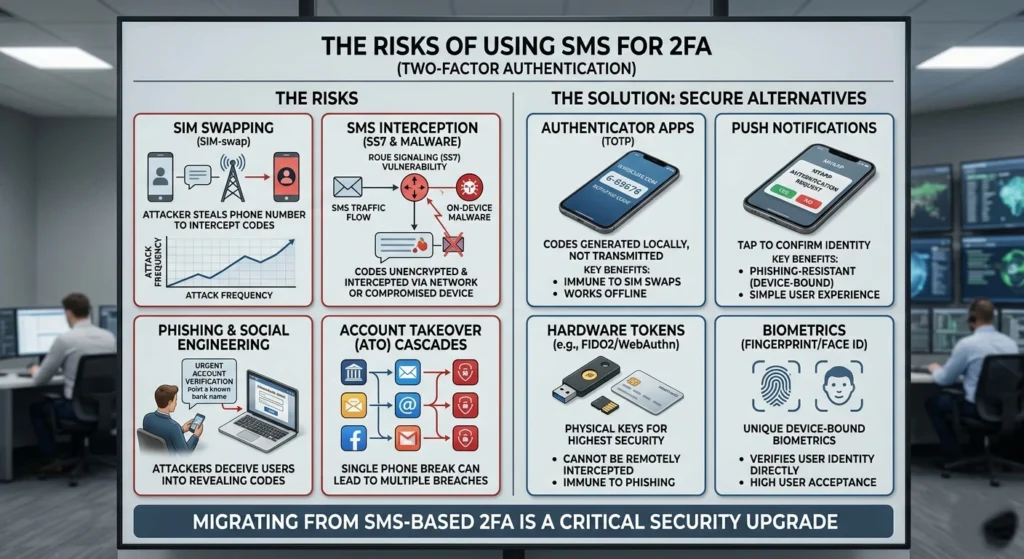
While SMS-based two-factor authentication (2FA) is widely used for its convenience, it comes with hidden vulnerabilities that many users overlook. From SIM swapping to interception attacks, relying on text messages for security can leave your accounts exposed to cybercriminals. Understanding these risks is the first step toward stronger, more reliable account protection.
How SMS-Based 2FA Works
When logging in, a one-time code is sent via text message to your registered phone number. You enter this code to verify your identity.
While simple, this method depends heavily.
- Mobile network availability
- Phone number ownership
- Messaging systems
Weak Points in SMS-Based Verification
Despite its popularity, SMS-based authentication has several inherent weaknesses.
Dependency on Mobile Networks
SMS delivery relies on telecom infrastructure.
- Messages can be delayed or fail to arrive
- Network outages can block access entirely
- International travel may disrupt message delivery
This creates both security and usability concerns, especially for users who need consistent access.
Phone Number as a Single Point of Trust
Your phone number becomes the central identifier. If control over that number changes, access to accounts can be affected.
This introduces risks.
- Number reassignment by carriers
- Loss of device without proper safeguards
- Dependency on telecom providers for identity validation
Exposure to Interception Risks
SMS messages are not designed with end-to-end encryption in mind.
- Messages can potentially be viewed during transmission
- Older network protocols may not offer strong protection
- SMS was originally built for convenience, not security
Real-World Implications
In practical terms, relying solely on SMS for verification can lead.
- Delayed account access during emergencies
- Increased reliance on customer support for recovery
- Reduced confidence in high-value account protection
For low-risk scenarios, SMS may be acceptable but for sensitive accounts, it falls short of modern security expectations.
What Are Security Keys and How Do They Work?
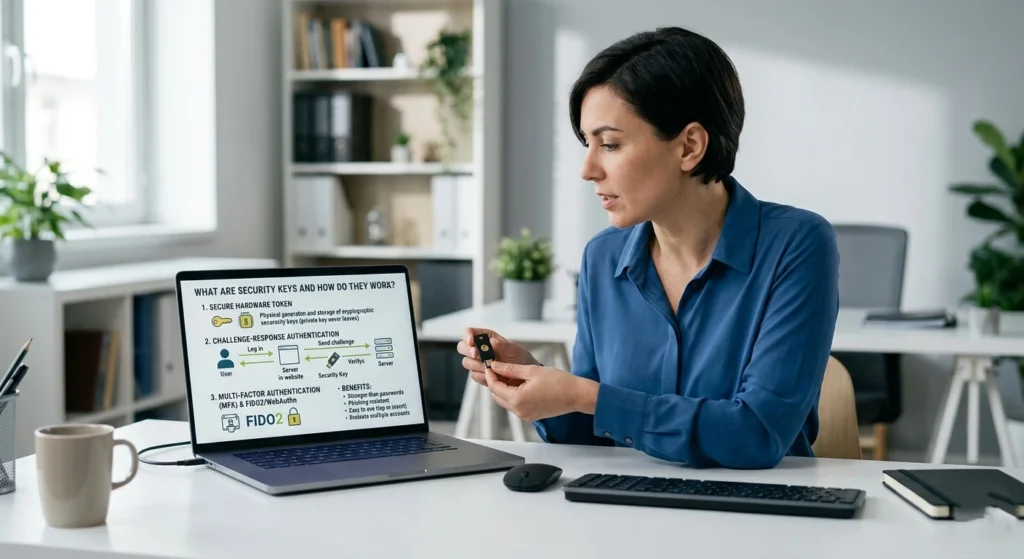
Security keys are physical devices that provide a powerful, resistant form of two-factor authentication (2FA). Unlike SMS or app-based codes, these keys use technology to verify your identity, making it nearly impossible for attackers to gain access to your accounts. what security keys are, how they work, and why they are quickly becoming the gold standard for online security.
Understanding Security Keys
A security key is a small physical device often resembling a USB drive or key fob—that you use during login to confirm your identity.
These keys work with modern authentication standards.
- FIDO (Fast Identity Online)
- WebAuthn (Web Authentication)
Together, these standards enable passwordless or multi-factor authentication that is resistant to many common vulnerabilities.
How Security Keys Authenticate Users
The process is both simple and powerful
- You enter your username and password
- The system prompts you to use your security key
- You insert the key or tap it (via USB, NFC, or Bluetooth)
- The key performs a data encryption verification
- Access is granted only if the verification is valid
The Role of Data Encryption
Unlike SMS codes, security keys use public-key Data Encryption, which works as follows.
- A private key is stored securely on the device
- A public key is stored by the service
- During login, the device proves possession of the private key without revealing it
This means sensitive data is never transmitted, significantly reducing exposure.
Built-In Protection Features
Security keys include several important safeguards.
- Device-bound credentials: Keys are tied to specific services
- No shared secrets: Unlike codes, nothing reusable is transmitted
- Origin verification: Ensures the request is coming from a legitimate service
- User presence check: Requires physical interaction (touch or tap)
These features make security keys one of the most secure authentication methods available today.
Benefits of Switching from SMS to Security Keys
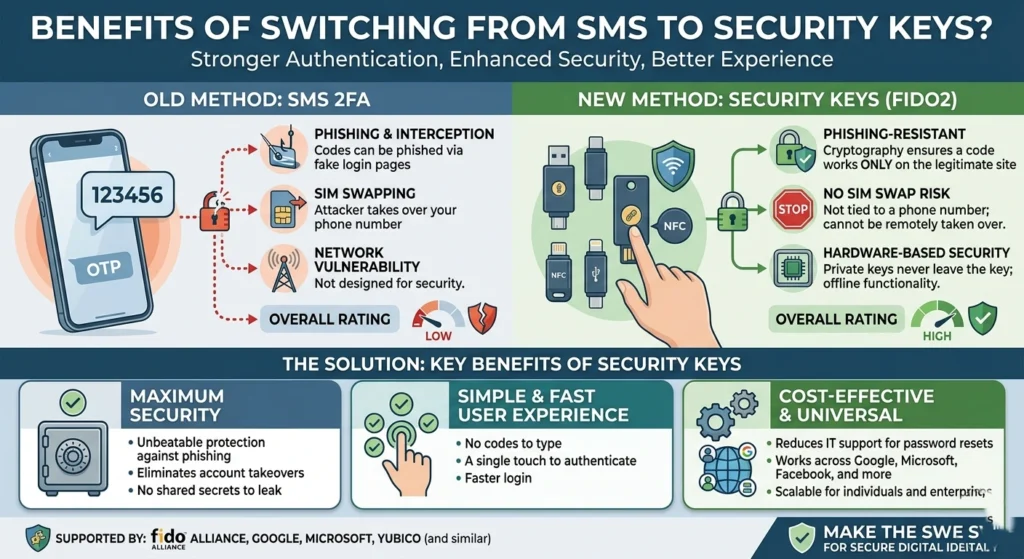
Switching from SMS-based two-factor authentication (2FA) to security keys offers more than just peace of mind it significantly strengthens your online security.
Security keys reduce the risk of attck SIM swapping, and other common attack, while providing a faster and more reliable login experience. key benefits of making the switch and why it is a smart move for anyone serious about protecting their digital life.
Stronger Protection Through Physical Authentication
Security keys require physical possession, which adds a tangible layer of security. Unlike a phone number, a physical key cannot be duplicated remotely.
This significantly reduces unauthorized access risks, especially for sensitive accounts.
Resistance to Common Weaknesses
Security keys are designed to address the limitations of SMS.
- No reliance on mobile networks
- No exposure to message-based vulnerabilities
- No dependence on telecom providers
This independence makes them more reliable and consistent.
Faster and More Convenient Login Experience
While they may seem less convenient at first, security keys often provide.
- Instant authentication (no waiting for codes)
- One-tap verification
- Reduced friction during login
Over time, users find that security keys simplify the login process rather than complicate it.
Enhanced Privacy
Security keys do not require.
- Phone numbers
- Personal identifiers
- Messaging systems
This means less personal data is shared or stored, improving overall privacy.
Ideal for High-Value Accounts
For accounts involving:.
- Financial data
- Business operations
- Personal identity
- Cloud storage
Security keys provide enterprise-level protection for everyday users.
Long-Term Reliability
Unlike phones, which can be lost, replaced, or upgraded frequently, security keys.
- Durable
- Purpose-built
- Independent of software updates
They offer consistent performance over time, making them a reliable long-term solution.
How to Migrate Your 2FA from SMS to Security Keys
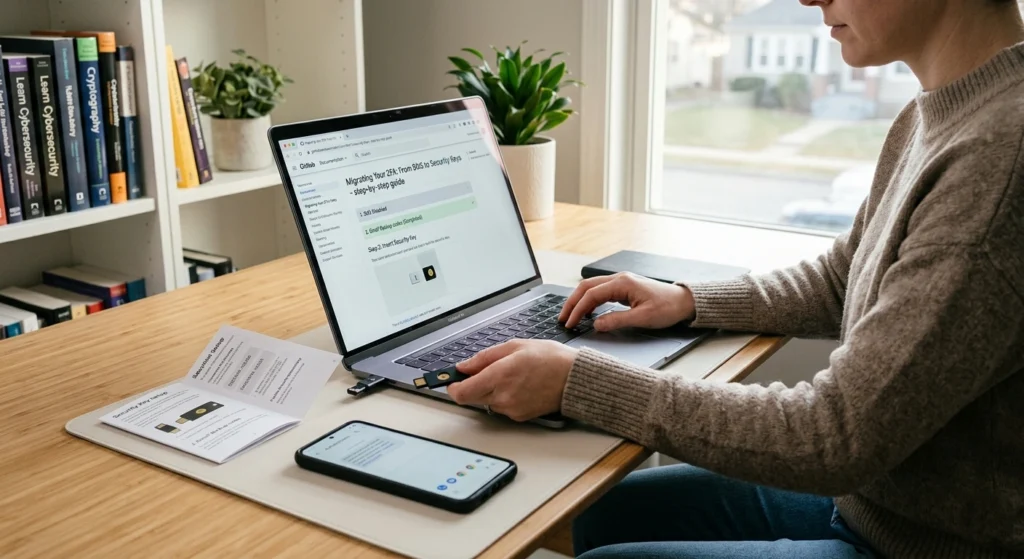
Transitioning to security keys may seem complex, but with the right approach, it can be done smoothly and securely. Upgrading your (2FA) from SMS to security keys does not have to be complicated.
Step 1: Choose a Compatible Security Key
Before starting, ensure the key supports.
- USB or NFC compatibility with your devices
- FIDO/WebAuthn standards
- Multiple device support if needed
Step 2: Enable Security Key Support on Your Accounts
Most major platforms now support security keys. Navigate.
- Account settings
- Security or login section
- Two-factor authentication settings
Look for options to add a security key as a verification method.
Step 3: Register Your Security Key
Follow the prompts.
- Insert or tap your key
- Confirm registration
- Assign a recognizable name (e.g., “Primary Key”)
Step 4: Set Backup Authentication Methods
Always prepare for unexpected situations.
- Register a second security key
- Keep backup codes محفوظ in a secure location
- Avoid relying solely on a single device
Redundancy ensures you never lose access to your accounts.
Step 5: Disable SMS-Based 2FA
Once your security key is active and tested.
- Remove SMS as a primary verification method
- Ensure all logins require the security key
This step is important to eliminate weaker fallback methods.
Step 6: Test Your Setup
Before relying fully on the new system.
- Log out and log back in
- Verify the key works across devices
- Confirm backup methods are functional
Common Questions About Security Keys and 2FA
Switching to security keys for (2FA) can raise a lot of questions, from compatibility and setup to usage and security benefits. Understanding the answers can help you confidently adopt this stronger authentication method and protect your accounts more effectively.
Are Security Keys Difficult to Use?
Not at all. Most users find them intuitive after the first use.
The process is usually.
- Plug in or tap
- Touch the key
- Gain access
It’s often faster than entering a code manually.
What Happens If I Lose My Security Key?
This is a valid concern. to avoid issues.
- Always register a backup key
- Store recovery codes securely
- Keep backup methods updated
Do Security Keys Work on All Devices?
Most modern devices support.
- USB-A or USB-C connections
- NFC for mobile devices
- Bluetooth for wireless use
Compatibility is continuously improving across platforms.
Are Security Keys Worth the Investment?
For users who value strong account protection, the answer is yes.
They provide a level of assurance that SMS-based systems cannot match, especially for critical accounts.
Can I Still Use Other 2FA Methods?
Yes, many platforms allow multiple methods. however, it is recommended.
- Prioritize security keys
- Use other methods only as backup options
Conclusion: Strengthen Your Security with 2FA Upgrade
Upgrading from SMS-based authentication to security keys is more than a technical change it is a strategic decision to enhance digital safety.
While SMS-based 2FA offers a basic level of protection, it comes with limitations that are increasingly difficult to ignore. Security keys, on the other hand, provide a modern, resilient, and privacy-focused solution.
adopting security keys, you gain.
- Stronger protection through physical verification
- Greater reliability without network dependency
- Improved privacy and reduced data exposure
- Faster and more seamless login experiences
where digital security is constantly evolving, taking proactive steps to upgrade your authentication methods is one of the smartest decisions you can make.
Your accounts deserve more than just convenience they deserve confidence.