For Linux enthusiasts, developers, and system administrators, compiling a custom Linux kernel is one of the most effective ways to unlock better system performance and achieve deeper hardware optimization. While most Linux distributions ship with generic kernels designed to support a wide range of devices, they often include unnecessary drivers and features that can slow down performance or limit hardware efficiency.
Whether you are optimizing a gaming PC, a development workstation, or a lightweight server, a custom Linux kernel allows you to fine tune your operating system for maximum efficiency. From enabling advanced processor features to removing unused modules, the process gives you complete flexibility over how your Linux system operates. Although compiling a kernel may seem intimidating at first, modern Linux tools and package managers have made the process far more approachable than ever before.
Why Build a Custom Linux Kernel for Performance Optimization

A standard Linux kernel shipped with most distributions is designed to support millions of different hardware combinations. While that approach delivers excellent compatibility, it also means the default kernel often includes drivers, modules, schedulers, and background capabilities your system may never use.
A custom Linux kernel allows you to optimize the operating system specifically for your processor, storage devices, memory configuration, and workload requirements. Instead of running a generic kernel designed for broad compatibility, you can build one tailored.
- High-performance desktop computing
- Software development environments
- Gaming systems
- Database servers
- Virtualization platforms
- Scientific computing workloads
- Embedded systems
- Low-latency audio/video production
One of the biggest advantages of kernel customization is resource efficiency. Removing unnecessary components reduces memory overhead, shortens boot times, improves responsiveness, and lowers CPU scheduling delays.
For example, systems using custom kernels optimized for modern processors often experience.
| Optimization Area | Typical Improvement |
|---|---|
| Boot Time | 10%–30% Faster |
| Memory Usage | Reduced by 5%–15% |
| CPU Scheduling Efficiency | Noticeably Improved |
| Storage Throughput | Better NVMe Responsiveness |
| Gaming Frame Stability | Lower Micro-Stutter |
| Thermal Efficiency | Reduced Background Load |
Another important reason for compiling a custom kernel is hardware enablement. New processors, graphics hardware, storage controllers, and network adapters may perform better on newer kernels than those included in long-term distribution releases.
A carefully optimized kernel can also reduce latency for demanding workloads. Developers working with virtualization, large-scale containers, or real-time applications often prefer tuned kernels because they provide tighter control over scheduling behavior and hardware interaction.
In enterprise environments, administrators frequently build specialized kernels to support.
- Custom storage systems
- Dedicated networking stacks
- Real-time workloads
- NUMA optimization
- Reduced overhead virtualization hosts
Beyond performance, compiling a kernel teaches valuable insight into how Linux communicates directly with hardware. Understanding the kernel architecture improves troubleshooting skills, system tuning knowledge, and overall Linux expertise.
Understanding the Linux Kernel Architecture
The Linux kernel acts as the core layer between hardware and software. Every process running on a Linux system eventually interacts with the kernel through system calls.
At a high level, the kernel manages
- CPU scheduling
- Memory allocation
- Device communication
- Filesystems
- Process isolation
- Power management
- Networking operations
The architecture of the Linux kernel is considered monolithic with modular capabilities. That means core functionality runs within kernel space while optional features can load dynamically as modules.
Core Components of the Linux Kernel
Process Scheduler
The scheduler determines how CPU time is distributed between running processes. Modern Linux kernels use advanced scheduling algorithms designed to balance.
- Responsiveness
- Throughput
- Latency
- Multi-core efficiency
The scheduler plays a major role in desktop smoothness and server scalability.
Memory Management
The memory subsystem controls
- Virtual memory
- Page caching
- Swap management
- NUMA awareness
- HugePages
- Memory compression
Efficient memory management directly impacts application responsiveness and multitasking performance.
Virtual Filesystem Layer
Linux supports many filesystem types through the Virtual Filesystem Switch (VFS).
- ext4
- XFS
- Btrfs
- F2FS
The VFS provides a unified interface between applications and storage systems.
Device Drivers
Drivers allow the kernel to communicate with hardware components.
- GPUs
- Storage controllers
- USB devices
- Audio hardware
- Network adapters
A custom kernel can remove unused drivers and optimize support for active hardware only.
Networking Stack
The networking subsystem handles
- TCP/IP communication
- Packet routing
- Traffic management
- Firewall frameworks
- Network namespaces
Optimized networking parameters are especially useful for servers and virtualization hosts.
Kernel Space vs User Space
Linux separates execution into two primary areas
| Space | Purpose |
|---|---|
| Kernel Space | Direct hardware interaction |
| User Space | Applications and user programs |
This separation improves stability because applications cannot directly modify hardware resources without kernel mediation.
Kernel Modules
Kernel modules are dynamically loadable components that extend functionality without rebuilding the entire kernel.
Examples include
- Filesystem support
- Graphics drivers
- Network drivers
- Audio systems
You may choose to compile critical drivers directly into the kernel for slightly faster initialization and simplified boot behavior.
Prerequisites for Compiling a Custom Linux Kernel
Before you begin compiling a custom Linux kernel, it is important to prepare your system with the right tools, packages, and basic technical knowledge.
Kernel compilation is a powerful process that directly affects how your operating system interacts with hardware, so having a stable setup and understanding the prerequisites can help prevent boot issues, compatibility problems, and failed builds. Proper preparation also makes the entire process smoother, faster, & easier to troubleshoot.
Hardware Requirements
Kernel compilation is CPU-intensive. Faster processors significantly reduce build time.
Recommended minimum hardware
| Component | Recommended |
|---|---|
| CPU | Quad-Core Modern Processor |
| RAM | 8 GB Minimum |
| Storage | 20 GB Free Space |
| Filesystem | ext4 or XFS |
| Cooling | Stable Thermal Performance |
Compilation times vary dramatically
| CPU Class | Approximate Build Time |
|---|---|
| Dual-Core CPU | 45–90 Minutes |
| Quad-Core CPU | 20–45 Minutes |
| 8-Core CPU | 10–25 Minutes |
| Modern High-End CPU | Under 10 Minutes |
Backup Your Existing Kernel
Always keep a working kernel available in the bootloader menu.
Before modifications
uname -rRecord the current kernel version.
Back up important configuration files
cp /boot/config-$(uname -r) ~/kernel-config-backupInstall Required Development Packages
On Ubuntu or Debian systems
sudo apt update
sudo apt install build-essential libncurses-dev bison flex libssl-dev libelf-dev bc dwarves git
On Fedora
sudo dnf groupinstall "Development Tools"
sudo dnf install ncurses-devel bison flex elfutils-libelf-devel openssl-devel bc dwarves
On Arch Linux
sudo pacman -S base-devel ncurses flex bison openssl elfutils bc pahole gitVerify Compiler Availability
Check GCC installation
gcc --versionCheck Make utility
make --versionModern Linux kernels generally compile best using newer compiler versions optimized for current CPU architectures.
Choosing the Right Linux Kernel Version

Selecting the right Linux kernel version is one of the most important steps when compiling a custom kernel for performance and hardware optimization. The Linux kernel is constantly updated with new features, security patches, driver improvements, and hardware support, but not every version is suitable for every use case.
Choosing the correct kernel version ensures system stability, compatibility, and the best possible performance for your specific hardware and workload.
- Stability
- Hardware compatibility
- Performance
- Long-term maintenance
Linux kernels are released in multiple categories.
Stable Kernels
Stable kernels receive regular maintenance and bug fixes while preserving compatibility.
These are recommended.
- Production systems
- Workstations
- Development environments
Long-Term Support (LTS) Kernels
LTS kernels receive updates for extended periods.
Popular LTS branches often remain supported for several years and provide.
- Better reliability
- Predictable updates
- Mature driver support
Ideal for
- Servers
- Enterprise deployments
- Long-term desktop systems
Mainline Kernels
Mainline kernels contain the newest features and hardware support.
Advantages include
- Latest CPU optimizations
- Updated filesystems
- Improved scheduling
- New hardware enablement
Potential trade-offs include less mature driver support in some cases.
Recommended Kernel Selection Strategy
| Use Case | Recommended Kernel Type |
|---|---|
| Stable Desktop | LTS |
| Gaming System | Recent Stable |
| Workstation | Stable |
| Development Testing | Mainline |
| Server Infrastructure | LTS |
| Embedded Devices | Customized Stable |
You can check the latest official releases from The Linux Kernel Archives
Setting Up the Linux Kernel Build Environment
Before compiling a custom Linux kernel, you must properly set up the Linux kernel build environment to ensure a smooth and error-free compilation process.
A well configured build environment provides all the essential development tools, libraries, and dependencies required to compile the kernel source code successfully. Without the correct setup, you may encounter build failures, missing package errors, or compatibility issues during installation.
Create a Dedicated Build Directory
mkdir -p ~/kernel-build
cd ~/kernel-build
Keeping kernel work isolated improves organization and simplifies future maintenance.
Optimize Parallel Compilation
Linux compilation benefits heavily from multi-core processors.
Check available threads
nprocCompile using all available threads
make -j$(nproc)Example performance scaling
| CPU Threads | Relative Build Speed |
|---|---|
| 2 Threads | Baseline |
| 4 Threads | 1.8x Faster |
| 8 Threads | 3.4x Faster |
| 16 Threads | 5x+ Faster |
Monitor System Temperature During Compilation
Kernel compilation places sustained load on processors.
Useful monitoring command
watch -n 2 sensorsMaintaining healthy temperatures improves system stability during long builds.
Accessing the Open Source Linux Kernel

The official Linux kernel source is maintained by Kernel.org. Linux kernel source code is one of the first practical steps in building a custom Linux kernel for performance and hardware optimization.
The source code contains the core components of the Linux operating system, including device drivers, system scheduling functions, memory management features, & hardware communication modules. obtaining the official kernel source, you gain full control over how your Linux system is configured & optimized.
Download the Latest Stable Kernel
Example
wget https://cdn.kernel.org/pub/linux/kernel/v6.x/linux-6.9.tar.xzExtract the archive
tar -xf linux-6.9.tar.xz
cd linux-6.9
Alternative: Clone Using Git
git clone https://git.kernel.org/pub/scm/linux/kernel/git/stable/linux.git
cd linux
Git-based workflows simplify updates and version tracking.
Verify Source Integrity
Checksum verification improves reliability.
sha256sum linux-6.9.tar.xzCompare against official checksums published on Kernel.org.
Configuring the Linux Kernel for Your Hardware
Configuring the Linux kernel for your hardware is one of the most critical stages in the custom kernel compilation process. This step allows you to customize the kernel specifically for your system components, enabling only the drivers, features, and modules your hardware actually needs.
Unlike generic distribution kernels that include support for a wide range of devices, a custom configured kernel can reduce unnecessary overhead, improve system responsiveness, and deliver better overall performance.
Start by copying the existing configuration
cp /boot/config-$(uname -r) .configUpdate settings
make oldconfigLaunch Interactive Configuration Menu
make menuconfigThis interface allows detailed customization.
Important Hardware Areas to Configure
Processor Family
Navigate to
Processor type and featuresSelect your exact CPU architecture for optimized instruction scheduling.
Example
- AMD Zen 4
- Intel Core 12th Gen
- Intel Xeon
- AMD EPYC
Proper CPU targeting enables better compiler optimization.
Storage Drivers
Enable only required storage systems
- NVMe
- SATA AHCI
- RAID controllers
Removing unused storage drivers reduces kernel size.
Filesystem Support
Enable only required filesystems.
Example
[*] ext4
[*] XFS
[ ] ReiserFS
Power Management
Laptop systems benefit from optimized
- CPU frequency scaling
- Sleep states
- Thermal management
Desktop performance systems may prioritize maximum sustained performance instead.
Essential Kernel Configuration Options for Performance Tuning
Kernel tuning can significantly improve responsiveness and throughput. Optimizing a custom Linux kernel involves more than simply compiling the source code it also requires selecting the right kernel configuration options for performance tuning.
The (Linux kernel includes thousands of configurable settings) that control CPU scheduling, memory management, power efficiency, hardware drivers, and system responsiveness.
Choosing the appropriate options can significantly improve overall performance, reduce system overhead, and create a faster, more efficient Linux environment tailored to your workload.
Preemption Model
The preemption model affects task switching latency.
Options include
| Mode | Best For |
|---|---|
| No Forced Preemption | Servers |
| Voluntary Preemption | Balanced Workloads |
| Full Preemption | Desktop Responsiveness |
Desktop users typically benefit from full preemption.
Timer Frequency
Kernel timer frequency impacts responsiveness.
Common values
| Frequency | Use Case |
|---|---|
| 100 Hz | Servers |
| 250 Hz | General Systems |
| 1000 Hz | Desktop/Low Latency |
Higher frequencies improve responsiveness but slightly increase CPU overhead.
Tickless System
Enable
CONFIG_NO_HZ_FULLThis reduces unnecessary timer interrupts and improves efficiency on idle CPUs.
Transparent HugePages
HugePages improve memory efficiency for large workloads.
Particularly useful
- Virtualization
- Databases
- Scientific workloads
Optimizing the Linux Kernel for CPU and Memory Performance

Processor and memory tuning directly affect system responsiveness. optimizing the Linux kernel for CPU & memory performance is a key step in building a high efficiency system tailored for modern workloads.
The Linux kernel acts as the core interface between hardware and software, meaning its configuration directly impacts how effectively your processor and memory resources are utilized.
With the right optimizations, you can reduce latency, improve multitasking, and ensure smoother performance across demanding applications such as gaming, development, and server operations.
CPU Frequency Scaling Governors
Linux supports several governors
| Governor | Behavior |
|---|---|
| performance | Maximum CPU Frequency |
| powersave | Reduced Frequency |
| schedutil | Dynamic Scaling |
| ondemand | Adaptive Performance |
High-performance systems often prefer
sudo cpupower frequency-set -g performanceNUMA Optimization
NUMA-aware systems benefit from memory locality optimization.
Check NUMA layout
numactl --hardwareServers with multiple CPUs gain noticeable efficiency improvements from proper NUMA handling.
Swap Optimization
Adjust swappiness
sudo sysctl vm.swappiness=10Lower values reduce swap usage on systems with sufficient RAM.
Compression Features
Modern kernels support compressed memory technologies like zswap and zram.
Benefits include
- Reduced storage writes
- Improved responsiveness under memory pressure
- Better multitasking behavior
Enabling Hardware-Specific Drivers and Features
Enabling hardware specific drivers and features is a crucial step when compiling a custom Linux kernel for performance and optimization.
While generic kernels include a wide range of drivers to support as many devices as possible, they often come with unnecessary modules that increase boot time and consume system resources.
Graphics Drivers
Enable the correct GPU drivers.
Example
AMDGPUIntel GraphicsNouveau
Built-in graphics support often reduces initialization delays.
NVMe Optimization
Enable
NVM Express block deviceModern NVMe drives achieve substantially better performance with optimized queue handling.
Network Adapter Drivers
Enable only active network hardware.
Performance-focused systems may also enable
- Receive Side Scaling
- Multi-Queue Networking
TCPCongestion Algorithms
Audio Systems
For low-latency audio production configure
- High-resolution timers
- Full preemption
- Optimized interrupt handling
Removing Unnecessary Kernel Modules for a Lightweight Build
Removing unnecessary kernel modules is an important optimization step when building a custom Linux kernel for a lightweight and high-performance system. The default Linux kernel is designed to support a vast range of hardware and use cases, which means it often includes many modules that may never be used on your specific machine.
Identify Loaded Modules
lsmodRemove Unused Filesystems
If not required, disable support.
- Legacy optical media
- Rare filesystems
- Obsolete network protocols
Disable Legacy Drivers
Older hardware drivers increase kernel size unnecessarily.
Removing unused components may reduce
- Boot initialization time
- Kernel image size
- Memory consumption
Example lightweight comparison
| Kernel Type | Image Size |
|---|---|
| Generic Distribution Kernel | 120–180 MB |
| Optimized Custom Linux Kernel | 60–100 MB |
Compiling the Custom Linux Kernel Step by Step
Compiling a custom Linux kernel is the stage where all your configuration and optimization work comes together into a fully functional system build.
Once the kernel source code is downloaded and properly configured for your hardware, the compilation process transforms it into a bootable kernel tailored specifically for your system’s performance and stability requirements.
This step is essential for applying all the custom Linux kernel settings, driver selections, and performance tuning options you have defined earlier.
Clean Previous Build Files
make cleanStart Kernel Compilation
make -j$(nproc)Compilation duration depends heavily on CPU performance.
Build Kernel Modules
make modules -j$(nproc)Install Modules
sudo make modules_installInstall the Kernel
sudo make installThis process updates
- Kernel image
- System.map
- Initial RAM filesystem
- Bootloader entries
Installing and Booting Into the New Linux Kernel
Installing and booting into the new Linux kernel is the final and most critical stage of the custom Linux kernel compilation process. After successfully compiling your optimized kernel, the next step is to properly install it onto your system so it can be loaded during startup.
Update GRUB
Ubuntu/Debian
sudo update-grubsudo grub2-mkconfig -o /boot/grub2/grub.cfgReboot the System
sudo rebootVerify Active Kernel
After booting
uname -rEnsure the system reports the newly compiled kernel version.
Verifying Kernel Performance and Stability
Verifying kernel performance and stability is the final and ongoing step after installing a custom Linux kernel. Once your system boots into the newly compiled kernel, it is essential to ensure that all components are functioning correctly and that the optimizations you applied are delivering the expected improvements.
CPU Benchmarking
Useful utilities
sysbench
stress-ng
Example CPU test
sysbench cpu runStorage Benchmarking
Example using fio
fio --name=benchmark --rw=read --size=1GMonitor System Responsiveness
Key metrics
- CPU latency
- Context switching
- Storage throughput
- Memory allocation speed
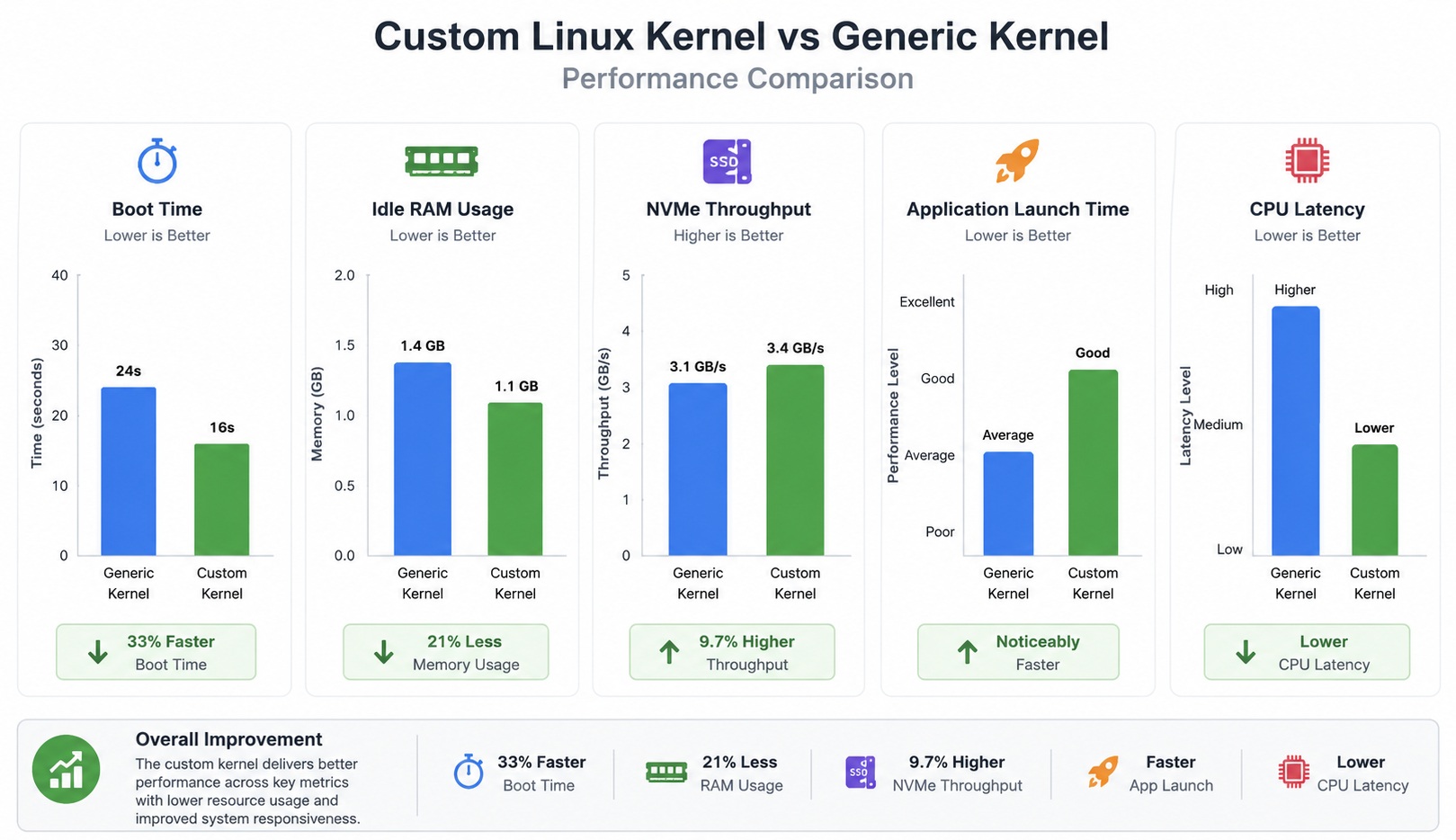
Example Performance Comparison
| Performance Metric | Generic Linux Kernel | Custom Optimized Kernel | Improvement |
|---|---|---|---|
| System Boot Time | 24 Seconds | 16 Seconds | ~33% Faster Startup |
| Idle RAM Consumption | 1.4 GB | 1.1 GB | Lower Memory Overhead |
| NVMe Storage Throughput | 3.1 GB/s | 3.4 GB/s | Improved Disk Performance |
| Application Launch Responsiveness | Standard | Faster and Smoother | Better User Experience |
| CPU Scheduling Latency | Higher Delay | Reduced Delay | Improved Responsiveness |
| Background Resource Usage | Moderate | Optimized | Lower System Load |
| Kernel Image Size | Larger Generic Build | Smaller Lightweight Build | Reduced Footprint |
| Multi-Core CPU Efficiency | Balanced | Hardware-Tuned | Better Thread Scaling |
| Power Efficiency | Standard Profile | Optimized CPU Scaling | Improved Thermal Behavior |
| Filesystem Responsiveness | Normal | Faster Metadata Access | Reduced I/O Delay |
Overall Performance Summary
| Area | Generic Kernel Experience | custom Linux kernel Experience |
|---|---|---|
| Desktop Responsiveness | Good | Noticeably Faster |
| Heavy Multitasking | Stable | More Efficient |
| Gaming and Rendering | Standard Performance | Lower Latency and Smoother Performance |
| Development Workloads | Balanced | Faster Compilation and Reduced Wait Times |
| Virtualization Performance | Normal Resource Handling | Improved CPU and Memory Scheduling |
| Large File Operations | Standard I/O Handling | Better NVMe and Storage Throughput |
Note: Actual performance improvements depend on processor generation, memory configuration, storage hardware, kernel tuning level, and workload type.
Troubleshooting Common Linux Kernel Compilation Errors

Troubleshooting common Linux kernel compilation errors is an essential skill when building a custom Linux kernel for performance and hardware optimization.
Even with proper preparation and configuration, kernel compilation can sometimes fail due to missing dependencies, misconfigured options, or incompatible settings.
Missing Development Packages
Common error
fatal error: openssl/ssl.h: No such fileSolution
Install OpenSSL development libraries.
Incompatible Compiler Versions
Check GCC compatibility
gcc --versionSome kernel versions require newer compilers.
Boot Failures
If the system fails to boot
- Select older kernel from
GRUB - Review configuration changes
- Rebuild problematic drivers
Module Loading Problems
Check module errors
dmesg | grep moduleInsufficient Storage Space
Kernel builds generate large temporary files.
Check storage availability
df -hBest Practices for Maintaining Custom Linux Kernels
Maintaining a custom Linux kernel is just as important as compiling and installing it, especially if you want long-term performance, stability, & security.
Unlike stock kernels that receive automatic updates from your distribution, a custom Linux kernel requires manual attention to ensure it stays up to date with security patches, hardware improvements, and bug fixes.
Following best practices helps you keep your system reliable while preserving the optimizations you worked to achieve.
Keep Multiple Kernels Installed
Always retain at least one stable fallback kernel.
Document Configuration Changes
Store configuration files safely
cp .config ~/kernel-configs/custom-kernel-v1Rebuild After Major Hardware Upgrades
New hardware may require updated drivers or kernel features.
Track Performance Metrics
Benchmark after major modifications to confirm optimization effectiveness.
Security Considerations When Using Custom Linux Kernels
Security considerations are a critical aspect of working with a custom Linux kernel, especially when the goal is performance and hardware optimization.
While building your own kernel gives you greater control and efficiency, it also places more responsibility on you to ensure that security features are properly enabled and that unnecessary risks are minimized.
A poorly configured kernel can unintentionally expose the system to vulnerabilities or weaken built-in protections.
Keep Kernels Updated
Regular updates improve
- Hardware support
- Stability
- Performance efficiency
Avoid Experimental Features on Production Systems
Testing-only features may reduce stability.
Enable Secure Boot Compatibility
Some systems require signed kernels for Secure Boot environments.
Monitor System Logs
Useful commands
journalctl -p 3 -xband
dmesgThese logs help identify hardware initialization issues.
Advanced Linux Kernel Optimization Techniques
Advanced Linux kernel optimization techniques go beyond basic configuration and driver selection, focusing instead on fine-tuning system behavior for maximum performance, responsiveness, and efficiency.
At this level, kernel tuning becomes highly specialized, allowing users to extract the best possible performance from their hardware while tailoring the operating system to specific workloads such as gaming, servers, development environments, or high-performance computing.
Custom Compiler Optimization Flags
Advanced builds may use optimized compiler settings
-march=native
-O2
These improve instruction efficiency for modern CPUs.
Low-Latency Kernel Configuration
Useful for
- Audio production
- Real-time processing
- Interactive workloads
Low-latency tuning reduces scheduling delays significantly.
Scheduler Optimization
Modern schedulers improve multi-core efficiency and workload balancing.
CPU Isolation
Dedicated CPU cores can improve deterministic performance.
Kernel parameter example
isolcpus=Useful for
- Virtualization
- Dedicated services
- Real-time applications
Storage Scheduler Tuning
Modern NVMe drives often benefit from optimized I/O schedulers.
Available schedulers
| Scheduler | Best Use Case |
|---|---|
| mq-deadline | Balanced Performance |
| kyber | Low Latency |
| bfq | Desktop Responsiveness |
| none | High-Speed NVMe |
Conclusion and Final Recommendations
Compiling a custom Linux kernel is one of the most powerful ways to optimize a Linux system for specific hardware and workloads. While the process requires careful planning and technical understanding, the benefits can be substantial for users seeking better responsiveness, reduced overhead, improved hardware utilization, and tighter control over system behavior.
A well-optimized kernel can deliver
- Faster boot performance
- Improved CPU scheduling
- Reduced memory overhead
- Better storage responsiveness
- Enhanced hardware efficiency
- Lower latency under demanding workloads
The most successful custom Linux kernel projects begin with clear goals. Some users prioritize desktop responsiveness, while others focus on server throughput, virtualization efficiency, or low-latency processing. Understanding workload requirements helps determine which kernel features should remain enabled and which components can be removed.
For most users, the ideal strategy includes
- Starting from the current working kernel configuration
- Applying gradual optimizations
- Testing carefully after each change
- Keeping fallback kernels available
- Tracking benchmark improvements consistently
Modern Linux kernels already provide excellent performance out of the box, but advanced customization allows experienced users to unlock additional efficiency tailored specifically to their systems.
With proper configuration, maintenance, and testing, a custom Linux kernel can transform a standard Linux installation into a highly optimized computing platform designed precisely for its intended workload.