The Linux kernel is the heart of any Linux-based operating system, playing a critical role in how your system functions. but what exactly is the Linux kernel, and how does it power the entire operating system.
Linux kernel architecture, explaining its key components, how they work together, and why the kernel is essential for system performance & stability. Whether you are a curious beginner or a seasoned developer, understanding the kernel will give you a greater appreciation for how Linux operates and how you can optimize it for your needs.
What is the Linux Kernel and Why Is It Important?

At the heart of every Linux-based system lies the Linux kernel, the core component responsible for managing communication between software and hardware. While users interact with applications, graphical interfaces, and commands, it is the kernel working silently underneath that makes everything possible.
The Linux kernel is often described as the central control system of an operating system. It directly interacts with hardware components such as the CPU, memory, storage devices, & input/output peripherals. Without it, software would have no structured way to access system resources.
Unlike many proprietary systems, Linux follows an open-source development model, allowing developers worldwide to contribute to its improvement. This collaborative approach has made the Linux kernel one of the most stable and efficient system cores available today.
Why the Linux Kernel Matters
The importance of the Linux kernel can be understood through its core responsibilities.
- Resource Management: Allocates CPU time, memory, and I/O bandwidth efficiently
- Hardware Abstraction: Provides a consistent interface for applications regardless of hardware differences
- System Stability: Ensures processes run without interfering with each other
- Security Foundation: Controls permissions and access between users and processes
In real-world scenarios, the Linux kernel powers everything from servers and cloud infrastructure to smartphones and embedded systems. Its flexibility and performance make it the backbone of modern computing environments.
How the Linux Kernel Powers Your Operating System
The Linux kernel acts as the bridge between user applications and physical hardware. When you run a program, the kernel ensures that it receives the necessary resources without disrupting other processes.
The Flow of Execution
When a user launches an application.
- The application sends a request to the kernel via a system call
- The kernel processes the request
- It interacts with hardware if necessary
- The result is returned back to the application
This interaction ensures that applications do not directly manipulate hardware, which maintains system integrity.
Example: Reading a File in Linux
When you open a file.
cat example.txtThe process involves.
- The shell sending a request
- The kernel locating the file in storage
- The file system driver retrieving data
- The kernel returning the content to the terminal
This entire process is handled seamlessly, demonstrating how the kernel powers everyday operations.
Kernel Space vs User Space
The Linux system is divided into two major areas.
| Area | Description |
|---|---|
| User Space | Where applications and user processes run |
| Kernel Space | Where core system functions execute |
This separation ensures stability and protection, preventing applications from directly interfering with critical system operations.
A Deep Dive Into Linux Kernel Architecture

The Linux kernel follows a monolithic architecture with modular capabilities, meaning all core services run in kernel space, but additional features can be dynamically loaded.
Linux kernel is the core of every Linux-based operating system, acting as the bridge between hardware and software. Understanding its architecture is crucial for anyone looking to get a deeper grasp of how Linux works, from system performance to security.
Key Architectural Layers
- System Call Interface – Entry point for user applications
- Process Management – Handles execution and scheduling
- Memory Management – Allocates and tracks system memory
- Device Drivers – Communicate with hardware devices
- File System Layer – Manages data storage and retrieval
Each layer plays a critical role in ensuring the system operates efficiently.
Monolithic vs Modular Design
While the kernel is monolithic, it supports loadable modules, allowing features to be added or removed without rebooting the system.
Advantages of this approach.
- High performance due to fewer context switches
- Flexibility through dynamic modules
- Easier maintenance and updates
This hybrid design is one of the reasons Linux performs exceptionally well in both desktop and enterprise environments.
Components of the Linux Kernel: An Overview
The Linux kernel is a complex, multi-layered system responsible for managing both hardware and software on your computer. To truly understand how Linux operates, it’s essential to break down its core components and how they interact with each other.
Core Components
| Component | Function |
|---|---|
| Scheduler | Determines which process runs next |
| Memory Manager | Handles RAM allocation and virtual memory |
| VFS (Virtual File System) | Provides a unified interface for file systems |
| Device Drivers | Enable communication with hardware |
| Networking Stack | Manages data transmission |
Process Scheduling
The scheduler ensures that CPU time is distributed fairly. Linux uses advanced scheduling algorithms like the Completely Fair Scheduler (CFS) to maintain balance between processes.
Virtual File System
The VFS allows different file systems (ext4, XFS, etc.) to operate under a single interface, making file handling consistent across the system.
The Role of the Kernel in Linux System Performance

The kernel plays a pivotal role in determining the performance of a Linux-based operating system. It manages system resources, coordinates hardware interactions, and ensures that software runs smoothly and efficiently. kernel’s efficiency in tasks like process scheduling, memory management, and I/O operations directly impacts the overall performance of your system.
quick breakdown of how key kernel components influence system performance.
| Kernel Component | Impact on Performance |
|---|---|
| Process Scheduler | Manages CPU time allocation, affecting task prioritization and multitasking. |
| Memory Management | Controls RAM usage, ensuring optimal memory allocation and preventing bottlenecks. |
| Device Drivers | Ensures hardware devices work efficiently, affecting I/O operations and system responsiveness. |
| File System Management | Optimizes data storage and retrieval, improving read/write speeds and file handling. |
Optimizing these kernel components, Linux systems can achieve superior performance, responsiveness, and resource utilization. Whether you are a developer or a system administrator, understanding the kernel’s role helps you fine-tune the system for better overall efficiency.
CPU Scheduling Efficiency
The kernel ensures that processes receive CPU time based on priority and fairness. This prevents bottlenecks and improves responsiveness.
Memory Optimization
Linux uses advanced memory techniques.
- Paging
- Caching
- Swapping
Example command to monitor memory usage.
free -hI/O Performance
Efficient handling of disk and network operations ensures faster data processing. The kernel uses buffering and caching to minimize delays.
Key Performance Factors
- Process scheduling accuracy
- Memory allocation efficiency
- Disk I/O management
- Network throughput
When optimized correctly, Linux systems can handle high workloads with minimal latency.
Understanding Kernel Modules and Their Functionality
Kernel modules are a critical aspect of the Linux kernel, allowing the system to be more flexible and dynamic. Unlike traditional operating systems, where the kernel is static, Linux enables parts of the kernel to be loaded or unloaded as needed through the use of kernel modules. This modularity not only enhances performance but also makes it easier to update or add features without needing to reboot the system.
What kernel modules are, how they work, and why they are essential for system customization and efficiency. how to manage kernel modules, including loading, unloading, and configuring them, along with some examples of common kernel modules and their functions.
Key Points.
- Efficiency: loading only necessary modules, Linux can conserve system resources & optimize performance.
- Dynamic Loading: Kernel modules can be loaded or unloaded on the fly without needing a system reboot.
- Customization: They allow for the addition of specific drivers or features tailored to the system’s needs.
What Are Kernel Modules?
They are pieces of code that can be loaded into the kernel when needed and removed when not in use.
Benefits of Kernel Modules
- Reduce kernel size
- Improve flexibility
- Allow hardware support without recompiling the kernel
Common Module Commands
lsmod        # List loaded modules
modprobe     # Load a module
rmmod        # Remove a module
Example Use Case
When a new hardware device is connected, the system loads the appropriate module automatically, enabling immediate functionality.
How the Linux Kernel Manages Hardware and Resources

At the heart of every Linux system, the kernel acts as the interface between the hardware and the software, ensuring that both work in harmony. It efficiently manages system resources like CPU, memory, & storage, and oversees the interaction with various hardware component, such as hard drives, network interfaces, and input devices.
how it handles the most crucial resources.
- I/O Management: It handles input/output requests, ensuring smooth communication between the system and hardware devices like hard drives, printers, and network cards.
- CPU Management: The kernel schedules tasks and allocates CPU time through a process scheduler, ensuring that each task gets its fair share of processing power while optimizing overall system responsiveness.
- Memory Management: The kernel controls how memory is allocated, tracked, and freed, preventing memory leaks and ensuring that processes don’t interfere with one another.
Hardware Abstraction Layer
The kernel hides hardware complexity by providing standardized interfaces, allowing applications to function regardless of device specifics.
Resource Allocation
The kernel manages.
- CPU usage
- Memory allocation
- Device communication
- Storage access
Interrupt Handling
When hardware requires attention, it sends an interrupt signal. The kernel responds immediately, ensuring real-time processing.
Linux Kernel vs. Other Operating System Kernels
Different operating systems use different kernel architectures.
Comparison Table
| Feature | Linux Kernel | Traditional Monolithic | Microkernel |
|---|---|---|---|
| Architecture | Monolithic with modules | Fully monolithic | Minimal core |
| Performance | High | Very High | Moderate |
| Flexibility | High | Low | High |
| Stability | High | Moderate | Very High |
Key Differences
- Linux balances performance and flexibility
- Microkernels prioritize modularity and isolation
- Traditional kernels focus on speed but lack flexibility
How to Interact with the Linux Kernel for System Optimization
Interacting with the Linux kernel to optimize system performance can significantly improve your computers responsiveness and efficiency. Since the kernel is responsible for managing hardware resources and software execution, making informed adjustments at the kernel level can have a powerful impact on overall system performance.
You can also fine-tune system settings for CPU, memory, and I/O performance to enhance both speed and resource usage.
Key Methods for Kernel Interaction.
- Modifying Kernel Parameters: You can adjust kernel parameters using files like
/etc/sysctl.conforsysctlcommands. for example, tweaking parameters related to process scheduling or network performance can yield noticeable improvements. - Loading/Unloading Kernel Modules: loading only the necessary kernel modules and unloading unused ones, you can free up system resources, reduce the kernel footprint, and boost performance.
- Recompiling the Kernel: For a advanced user recompiling the kernel to remove unnecessary features or add new ones can optimize performance further. customizing the kernel configuration, you ensure that only the required modules and features are included, minimizing overhead.
- Using Kernel Tunables: Linux provides various tunable options (like
vm.swappiness) that allow fine-grained control over system behavior. Tuning these parameters can help with memory management, CPU load balancing, and other system optimizations.
Useful Kernel Commands
uname -r      # Check kernel version
top           # Monitor system performance
htop          # Advanced process viewer
Sysctl Configuration
The sysctl interface allows runtime tuning of kernel parameters.
Example.
sysctl -aTo adjust a parameter.
Monitoring Kernel Logs
dmesgThis command provides insights into system events and hardware interactions.
The Evolution of Linux Kernel Architecture
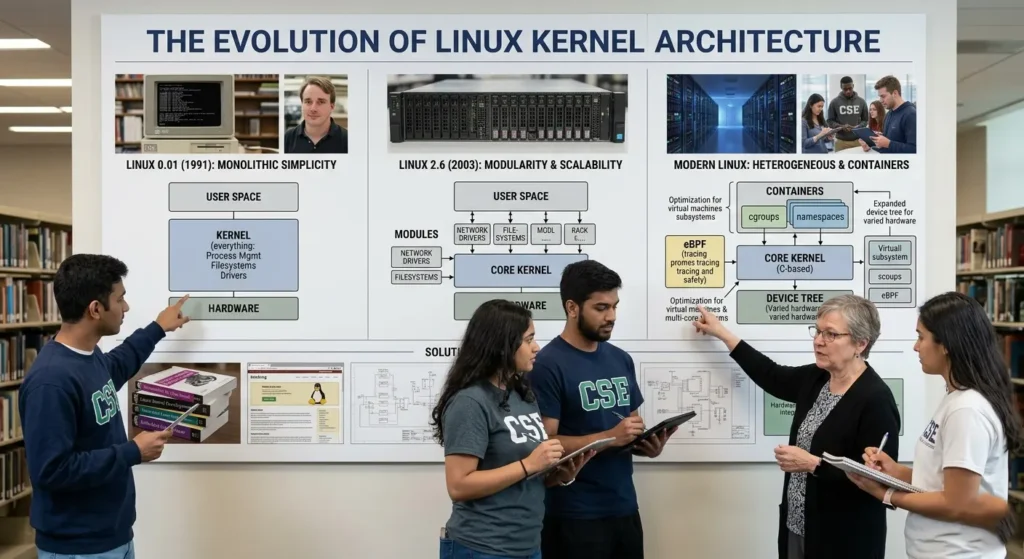
The Linux kernel has undergone significant changes since its creation in 1991, evolving from a simple, monolithic kernel to the highly modular, efficient, & scalable system we rely on today. Over the years, the kernel has adapted to the growing needs of the computing world, with improvements in performance, security, hardware support, and system management.
Key Milestones in the Evolution of Linux Kernel Architecture
- Early Years (1991-1994) The first versions of the Linux kernel were relatively basic, designed to support simple Unix-like systems with limited hardware. During this period, the kernel was monolithic, meaning all of its components were tightly integrated into a single block of code.
- Modularization (1995-2000) As Linux gained popularity, the need for greater flexibility grew. The introduction of kernel modules allowed for dynamic loading and unloading of components, enabling users to customize their systems without recompiling the entire kernel.
- Performance Enhancements (2000-2010) With the rise of multi-core processors and the increasing complexity of modern systems, the Linux kernel saw numerous performance improvements, including better process scheduling, memory management, and support for new hardware architectures.
- Security and Scalability (2010-Present) As security became a top concern, the Linux kernel incorporated features like SELinux (Security-Enhanced Linux), improved system call security, and more efficient handling of resources for virtualized environments. Today, the kernel is highly scalable, supporting everything from embedded devices to large-scale data centers.
Key Milestones
- Early versions focused on basic functionality
- Introduction of modular architecture improved flexibility
- Advanced scheduling enhanced performance
- Support for modern hardware expanded usability
Continuous Development
Final Thoughts
The Linux kernel is more than just a system component it is the foundation that powers the entire operating system. From managing hardware resources to ensuring system stability, its role is essential in every computing environment.
Understanding its architecture provides valuable insight into how modern systems operate. Whether you are a beginner or an advanced user, learning about the Linux kernel opens the door to deeper system knowledge and improved performance optimization.
Mastering the Linux kernel means understanding the very core of computing itself.