Modern computing relies heavily on operating systems that manage hardware, run applications, and provide a platform for everyday digital activities. Among the many operating systems available today, Microsoft Windows and Linux remain two of the most widely discussed and widely used options. for daily users people who browse the internet, manage files, stream media, or work on documents the choice between these two systems can significantly influence productivity, security, and overall experience.
While Windows dominates the global desktop market, Linux has grown steadily due to its stability, flexibility, and open-source ecosystem. Each system has its own strengths and limitations, and understanding those differences helps users choose the platform that fits their needs best.
This detailed comparison explains how Linux and Windows differ in areas such as performance, usability, security, software compatibility, hardware requirements, and long-term cost. The goal is not to promote one system over the other but to help everyday users understand how each platform works and which environment may suit their daily computing habits.
Overview of Linux and Windows Operating Systems
Operating systems act as the central layer between a computer’s hardware and the applications users interact with every day. Both Linux and Windows serve this purpose, but they are built on different philosophies and development models.
Understanding the Windows Operating System
Microsoft Windows is a proprietary operating system developed by Microsoft. Since its initial release in 1985, Windows has evolved into the most widely used desktop operating system globally.
Modern versions such as Windows 10 and Windows 11 are designed with ease of use in mind. They provide graphical interfaces, extensive software compatibility, and integrated services for productivity, gaming, and multimedia.
Key characteristics of Windows.
- A consistent graphical user interface across versions
- Strong support for commercial software
- Broad compatibility with consumer hardware
- Integration with Microsoft services such as cloud storage and productivity tools
Because Windows is proprietary, its source code is not publicly available. Users receive updates and features directly from Microsoft, which controls development, security patches, and system improvements.
Understanding the Linux Operating System
Linux is an open-source operating system built around the Linux Kernel, originally created by Linus Torvalds in 1991. Unlike Windows, Linux is not owned by a single company. Instead, it is maintained by a global community of developers and organizations.
Linux is distributed in multiple versions known as distributions (often called “distros”).
Popular examples.
- Ubuntu
- Fedora
- Debian
- Linux Mint
Each distribution offers different features, interfaces, and software packages, but all rely on the same core kernel.
Linux is widely used in servers, cloud computing, and development environments. However, many desktop distributions are designed specifically for everyday users who want a stable and customizable computing platform.
Key Philosophical Differences
The fundamental difference between Linux and Windows lies in their development approach.
- Windows is a closed-source commercial product controlled by Microsoft.
- Linux is open-source and developed collaboratively by a global community.
This difference influences everything from system customization to cost and security practices.
User Interface and Ease of Use Comparison
The user interface determines how easily people can interact with their computer. for most daily users, simplicity and familiarity are major factors when choosing an operating system.
The Windows User Experience
Windows is known for its consistent and intuitive interface. Features such as the Start Menu, taskbar, and system tray have remained central elements since early versions of the operating system.
Familiar Layout and Navigation
The Windows desktop environment typically.
- A taskbar for running applications
- A Start Menu for launching programs
- File Explorer for managing documentsand folders
- Settings panels for configuring system options
Because Windows has been dominant in home and office environments for decades, many users already understand its layout without requiring extensive learning.
Accessibility Features
Recent Windows versions include numerous accessibility features.
- Screen readers
- Voice typing
- Magnification tools
- High-contrast display modes
These features help ensure that users with different needs can interact with the system comfortably.
The Linux Desktop Experience
Unlike Windows, Linux offers multiple desktop environments. This means the visual appearance and navigation style can vary depending on the distribution and interface.
Popular Desktop Environments
Common Linux desktop environments.
- GNOME
- KDE Plasma
- Xfce
- Cinnamon
Each environment has a unique design philosophy.
for example.
- GNOME emphasizes minimalismand simplicity.
- KDE Plasma offers extensive customizationoptions.
- Xfce focuses on lightweight performance.
Learning Curve for Beginners
While modern Linux distributions are more user-friendly than ever, some users may initially find the variety of interfaces confusing. Tasks such as installing software or managing system settings may work differently compared to Windows.
However, many distributions now include graphical tools that make everyday operations easier for beginners.
Performance and Speed Differences
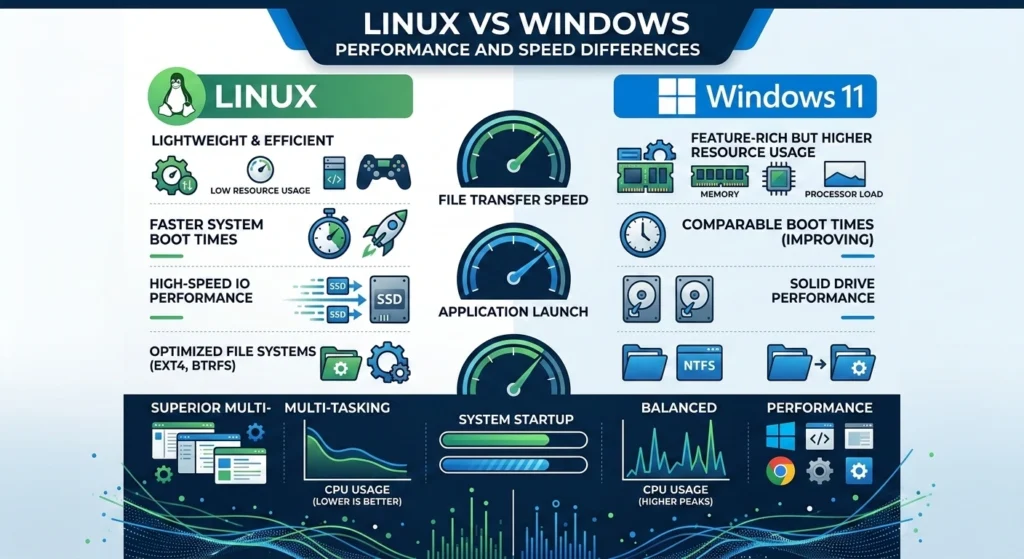
System performance is one of the most noticeable factors in everyday computing. It determines how quickly applications open, how efficiently tasks run, and how responsive the system feels.
Resource Management in Windows
Windows is designed to support a wide variety of consumer applications and hardware. Because of this broad compatibility, the operating system includes many background services and features.
System Resource Usage
- Memory usage
- Background services
- Startup processes
For example, a fresh installation of Windows typically uses several gigabytes of storage and a significant amount of RAM for system processes.
Optimization and Updates
Microsoft regularly releases performance updates and improvements through system patches. These updates help maintain stability but can occasionally affect system performance temporarily.
Performance Efficiency in Linux
Linux is widely known for its efficient resource management.
Lightweight System Architecture
Many Linux distributions are designed to run efficiently even on older hardware. Lightweight desktop environments can operate smoothly with minimal RAM and CPU usage.
This efficiency makes Linux particularly useful.
- Reviving older computers
- Running servers
- Development environments
Faster System Boot and Responsiveness
Because Linux systems often run fewer background services, they may start faster and feel more responsive in everyday tasks such as browsing or file management.
However, actual performance can vary depending on the chosen distribution, desktop environment, and system configuration.
Software Availability and Compatibility

Access to software is one of the most practical considerations for daily users. When choosing an operating system, one of the most important factors to consider is whether the software you rely on is available and compatible.
Windows has long been known for its wide range of applications, from productivity tools to games, while Linux offers a growing library of open-source software, though some programs may require alternatives or additional configuration.
Software Ecosystem in Windows
Windows has the largest ecosystem of commercial desktop software. Many widely used applications are designed primarily for Windows systems.
Common categories of Windows software.
- Productivity applications
- Creative tools
- enterprise software
- PC games
Windows also supports a wide variety of legacy programs, which is important for businesses and organizations that rely on older applications.
Software Distribution in Linux
Open-Source Software Libraries
Linux distributions provide thousands of applications in their official repositories, covering areas.
- Web browsing
- office productivity
- media playback
- programming tools
Most of these programs are open source and maintained by the community.
Compatibility Challenges
Some proprietary software developed specifically for Windows may not run natively on Linux. This can be a limitation for users who rely on specialized commercial applications.
Security Features and Vulnerabilities
Security is a critical factor in modern computing, particularly as cyber threatscontinue to evolve.
Security Model in Windows
Windows has historically been a primary target for malware due to its widespread use.
Built-In Security Features
Modern versions of Windows include advanced security tools.
- Microsoft Defender
- Firewall protection
- Secure boot technology
- Regular security updates
These features have significantly improved Windows security over the past decade.
Common Threat Landscape
Because Windows is the most widely used desktop operating system, it is often targeted by malicious software. This does not mean the system is inherently insecure, but it does require regular updates and responsible user practices.
Security Architecture in Linux
Linux benefits from a security model designed around strict user permissions.
Permission-Based System Design
Linux separates administrative privileges from regular user activities. This reduces the risk of unauthorized system changes or malware infections.
Open-Source Transparency
Because Linux is open source, security researchers and developers can review its code and identify vulnerabilities more quickly.Community-driven updates often address security issues rapidly.
While open-source operating system is generally considered secure, no operating system is immune to vulnerabilities, and users must still follow safe computing practices.
Customization and Flexibility Options
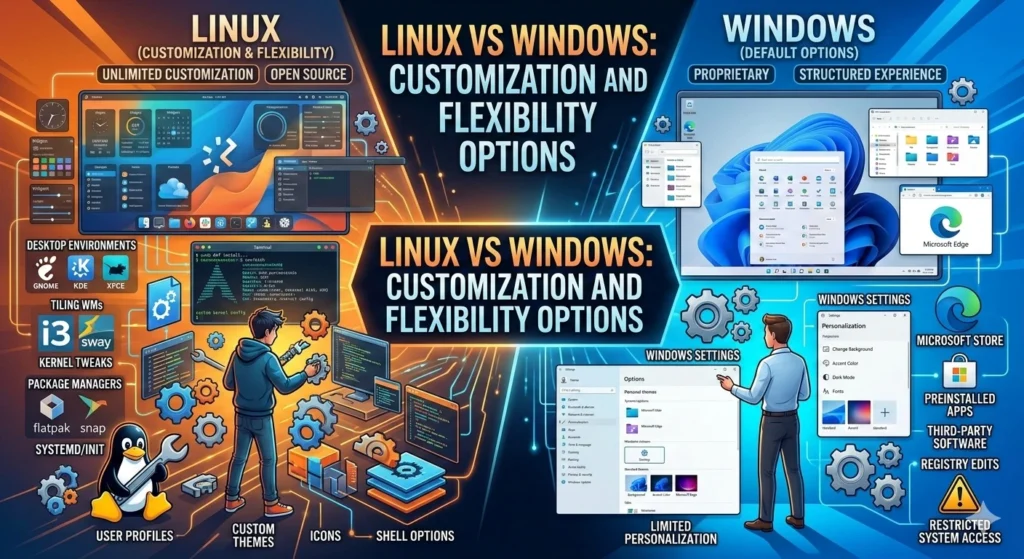
Customization is an area where Linux and Windows differ significantly. One of the key differences between Linux and Windows is the level of customization and flexibility each operating system offers.
Linux is highly flexible, allowing users to modify almost every aspect of the interface, install different desktop environments, and tailor the system to their exact needs. Windows, on the other hand, provides a more standardized experience with limited customization options, focusing on simplicity and ease of use.
Customization in Windows
Windows allows users to personalize elements.
- Desktop themes
- Wallpapers
- System colors
- Taskbar settings
However, deeper system modifications are limited because the operating system is closed source.
Flexibility in Linux
Linux offers nearly unlimited customization.
Users can modify.
- Desktop environments
- Window managers
- system behavior
- command-line tools
Advanced users can even build their own customized Linux systems tailored to specific workflows.
This flexibility is one reason open-source OS is widely used by developers, system administrators, and technical professionals.
Hardware Requirements and Support
Hardware compatibility plays a major role in operating system performance.
Hardware Support in Windows
Because Windows is used by millions of consumers worldwide, hardware manufacturers often design drivers specifically for it.
This results.
- strong compatibility with consumer hardware
- easy installation on new computers
- wide support for peripherals
Most new PCs are shipped with Windows preinstalled, making hardware integration straightforward.
Hardware Compatibility in Linux
Linux supports a wide range of hardware, especially open standards.
However, some proprietary hardware drivers may not be available immediately for open-source operating system. Community developers often create alternative drivers to support these devices.
In many cases, Linux works exceptionally well on older hardware that may struggle with newer Windows versions.
Cost and Licensing Differences
The financial aspect of operating systems can also influence user decisions.
Licensing Model of Windows
Windows requires a commercial license purchased from Microsoft or included with a new computer.
The price of a license depends on the edition and distribution channel.
Because it is proprietary software, users must agree to Microsoft’s licensing terms and restrictions.
Cost Structure of Linux
Most Linux distributions are free to download, install, and use.
This is possible because Linux is distributed under open-source licenses that allow users to access and modify the source code.
Organizations may pay for professional support or enterprise services, but the operating system itself is typically available at no cost.
Community Support and Resources
Reliable support and documentation are essential for troubleshooting technical issues.
Support Ecosystem for Windows
Windows users typically rely.
- official Microsoft documentation
- customer support services
- online tutorials and knowledge bases
Linux Community Support
Linux benefits from one of the largest collaborative technology communities in the world.
Users can access support through.
- developer forums
- community documentation
- technical discussion platforms
- open-source project repositories
Many open-source operating system distributions maintain detailed documentation and active support forums where users share solutions and best practices.
Which OS Is Better for Daily Users?
Choosing between Linux and Windows depends largely on individual needs and preferences.
When Windows May Be the Better Choice
Windows may be ideal for users.
- rely on specific commercial applications
- want the most straightforward setup
- prefer familiar desktop environments
- play PC games designed primarilyfor Windows
Because it is widely supported by software developers and hardware manufacturers, Windows remains the default choice for many home and office environments.
When Linux May Be the Better Option
Linux may appeal to users.
- prefer open-source technology
- want greater system controland customization
- use older hardware
- prioritize privacy and transparency
For many everyday tasks such as browsing the web, managing documents, and streaming media, open-source operating system provides a stable and efficient alternative to Windows.
Final Thoughts
Windows remains the dominant platform for general consumers due to its extensive software ecosystem and user-friendly design. Linux, on the other hand, offers exceptional flexibility, strong security principles, and a powerful open-source community.
For daily users, the best choice depends on personal priorities whether those priorities include software compatibility, customization, performance efficiency, or long-term cost.