In 2026 staying on top of your data privacy is more important than ever especially for remote workers and students who are constantly online. Whether you’re attending classes, collaborating with coworkers, or just catching up on emails, your personal information is constantly at risk. With cyber threats evolving every day, keep your data safe should be a priority.
But don’t worry it’s not as complicated as it might seem. In this guide, we’ll walk you through 10 easy-to-follow data privacy tips to help you stay secure, whether you’re working from home or studying remotely. from setting up strong passwords to using a VPN, these simple yet effective steps will make a huge difference in keep your information protected.
Let’s dive into some practical ways to safeguard your privacy and keep you one step ahead of potential threats!
Why Data Privacy is Crucial for Remote Workers and Students in 2026

The way we work and study has changed permanently. Remote jobs, online classes, cloud collaboration, and digital communication tools have become the norm. But with this shift comes a serious downside: your personal and professional data is more exposed than ever before.
cyber threats are no longer limited to large corporations. Students, freelancers, remote employees, and even casual internet users are prime targets. Cyber threat now use advanced techniques such as AI-driven Cyber deception, identity theft automation, and deepfake deceptive practices. According to global cybersecurity trends, data breaches and personal account compromises are increasing every year, especially among users with weak security habits.
For remote workers Privacy, a single data breach can mean.
- Loss of sensitive company data
- Legal consequences
- Damaged professional reputation
For students, it can lead.
- Identity theft
- Academic data manipulation
- Financial fraud
Data privacy is no longer optional it’s a personal responsibility. The following tips are designed to help you build a strong, practical defense against modern digital threats.
Use Strong, Unique Passwords for All Accounts
Passwords remain the first line of defense in digital security. Yet, many people still use weak combinations like “123456” or reuse the same password across multiple platforms. This creates a dangerous vulnerability.
Why weak passwords are a major risk
When one account is compromised, Cyber threat often attempt the same credentials across other platforms. This is known as credential stuffing, and it’s extremely effective.
What makes a strong password
A secure password should.
- Be at least 12–16 characters long
- Include a mix of uppercase, lowercase, numbers, and symbols
- Avoid personal information like names or birthdates
Example of a strong password.
- T9#kL!vP2@rQ8mZ
The importance of uniqueness
Using a unique password for every account ensures.
- A breach in one platform doesn’t affect others
- Your email, banking, and academic accounts stay protected
Practical strategy for managing passwords
Instead of memorizing dozens of passwords.
- Use passphrases (e.g., BlueSky!Runs@Night2026)
- Change passwords regularly, especially for critical accounts
- Avoid writing passwords in unsecured notes or browsers
Small effort, massive protection this habit alone can prevent most account breaches.
Enable Two-Factor Authentication (2FA) for Added Protection
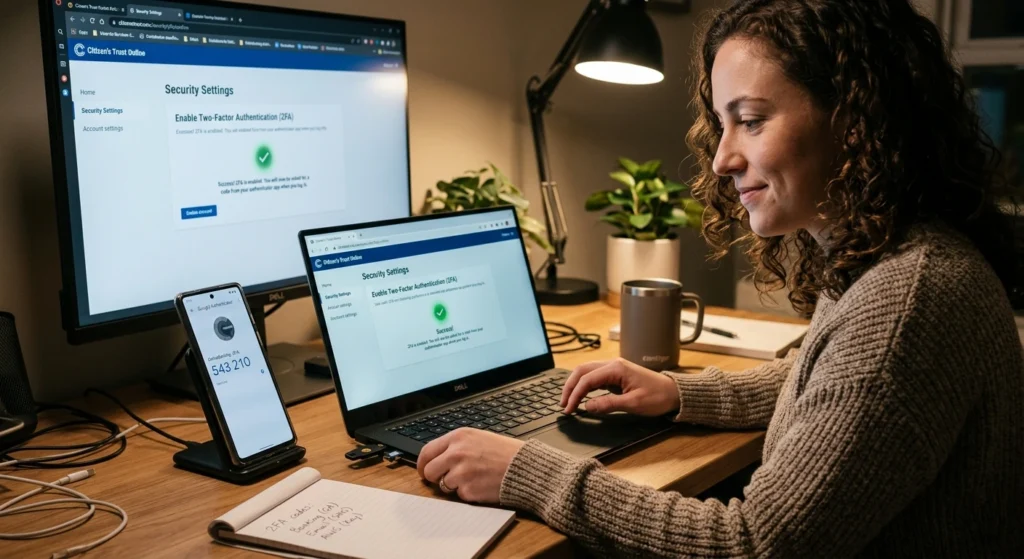
Even the strongest password isn’t foolproof. That’s where Two-Factor Authentication (2FA) comes in. 2FA adds an extra verification step beyond your password, making unauthorized access significantly harder.
How 2FA works
After entering your password, you must verify your identity using.
- A one-time code sent to your phone
- An authentication app
- Biometric verification (fingerprint or face recognition)
Why 2FA is essential in 2026
Malicious actor now use automated tools that can unofficial software or steal passwords quickly. With 2FA:
- Even if your password is compromised, your account remains secure
- It blocks unauthorized logins instantly
Types of 2FA methods
- SMS-based codes – Convenient but less secure
- Authentication apps – More secure and widely recommended
- Hardware keys – Highest level of protection
Best practice
Enable 2FA on.
- Email accounts
- Cloud storage platforms
- Banking and financial apps
- Learning management systems
This single step can reduce your risk of account compromise by over 90%.
Regularly Update Software and Applications
Ignoring software updates is one of the most common mistakes users make. Updates are not just about new features they often contain critical security patches.
Keep your software and applications up to date is one of the easiest yet most effective ways to protect your personal data and ensure your device runs smoothly. Software updates often include important security patches that fix vulnerabilities cyber threat could exploit.
Why updates matter
Outdated software can contain vulnerabilities that exploit.
- Gain unauthorized access
- Install Cyber threats
- Steal sensitive data
Real-world impact
Many large-scale cybersecurity breach have succeeded simply because users didn’t update their systems. Even a small delay can leave your device exposed.
What should you update regularly
- Operating systems (Windows, macOS, Linux)
- Mobile OS (Android, iOS)
- Browsers and extensions
- Productivity and communication apps
Automatic updates: your best defense
Enable automatic updates whenever possible.
- Immediate protection against newly discovered threats
- Minimal effort from your side
Consistency is key
Make it a habit.
- Check for updates weekly
- Restart devices after updates
- Remove unsupported or outdated apps
Staying updated is one of the simplest yet most powerful privacy protections available.
Use a Virtual Private Network (VPN) When Accessing Public Wi-Fi
Public Wi-Fi networks like those in cafes, libraries, and campuses are convenient but highly insecure. When you’re working or studying on the go, public Wi-Fi networks are convenient but come with their own set of risks.
These networks, often found in coffee shops, airports, or libraries, can expose your personal data if not properly secured. That’s where a Virtual Private Network (VPN). encrypting your internet connection, a VPN ensures that your online activity–remains private, even when using unsecured networks.
The hidden dangers of public Wi-Fi
Cyber threat can.
- Intercept your internet traffic
- Steal login credentials
- Monitor your online activity
This type of security breach is known as a man-in-the-middle security breach, and it’s more common than most users realize.
How a VPN protects you
A VPN.
- Encrypts your internet connection
- Hides your IP address
- Prevents data interception
When should you use a VPN
- While working from cafes or coworking spaces
- During online classes on public networks
- When accessing sensitive accounts outside home
Key benefits
- Enhanced privacy even on unsecured networks
- Protection from tracking and surveillance
- Safe access to online services
Important note
A VPN is not optional anymore it’s essential for anyone who frequently connects to public Wi-Fi.
Be Cautious with Email and Cyber deception Deceptive practices
security breach have evolved significantly. In 2026, they are more convincing, personalized, and harder to detect. Emails are one of the most common ways malicious actor attempt to gain access to your personal information.
emails designed to trick you into revealing sensitive details are becoming increasingly sophisticated. These emails might look like they come from trusted sources, such as your bank or workplace, but they often contain harmful links or attachments that can compromise your privacy.
What is Cyber deception
Cyber deception is a method where Unauthorized users trick you
- Clicking malicious links
- Sharing personal information
- Downloading harmful attachments
Modern Cyber deception techniques
- AI-generated emails that mimic real communication
- Fake login pages identical to real ones
- Urgent messages demanding immediate action
Warning signs to watch for
- Suspicious email addresses
- Unexpected attachments
- Messages creating urgency or fear
- Links that don’t match official websites
How to stay safe
- Never click unknown links
- Verify sender identity before responding
- Avoid downloading attachments from unknown sources
Golden rule
If something feels off, it probably is.
Awareness is your strongest defense against Cyber deception Security breach.
Encrypt Sensitive Data on Your Devices
Encryption converts your data into unreadable code, ensuring that even if your device is compromised, the information remains protected.
Why encryption is critical
Without encryption.
- Stolen devices can expose all your data
- Cyber threat can easily access stored files
With encryption.
- Data becomes inaccessible without proper authentication
Types of data you should encrypt
- Personal documents
- Academic records
- Work-related files
- Financial information
Device-level encryption
Modern devices offer built-in encryption features.
- Enable full-disk encryption on laptops
- Use secure lock screens on mobile devices
File-level encryption
For highly sensitive data.
- Encrypt individual files or folders
- Use password-protected storage
Encryption ensures that your data stays safe even in worst-case scenarios.
Monitor Your Privacy Settings on Social Media and Other Platforms

Many users unknowingly expose personal information through social media and online platforms. digital world, social media and online platforms are integral parts of our daily lives, but they also come with privacy risks.
The more information you share online, the more vulnerable you become to potential misuse of your personal data. Regularly reviewing and adjusting your privacy settings on social media and other platforms is key to controlling who can access your information.
Why privacy settings matter
Oversharing can lead.
- Identity theft
- Social engineering security breach
- Unwanted tracking
What to review regularly
- Profile visibility
- Data sharing permissions
- Third-party app access
Common mistakes
- Keeping profiles public
- Sharing location data
- Allowing unnecessary app permissions
Smart privacy practices
- Limit audience to trusted contacts
- Disable location tracking when not needed
- Remove unused apps connected to your accounts
Control what you share because once data is public, it’s difficult to take back.
Secure Your Home Wi-Fi Network with Strong Encryption
Your home Wi-Fi network is the backbone of your remote work or study environment. If it’s not secure, everything connected to it is at risk. Your home Wi-Fi network is the gateway to all your online activity, so keeping it secure is crucial to protecting your personal data.
Without proper encryption, your Wi-Fi can be easily accessed by unauthorized users, putting your sensitive information at risk. Using strong encryption protocols, like WPA3, helps ensure that only authorized devices can connect to your network.
Why home networks are targeted
cyber threat can.
- Access connected devices
- Monitor online activity
- Launch security breach on other networks
Essential security measures
- Use WPA3 or WPA2 encryption
- Set a strong, unique Wi-Fi password
- Change default router credentials
Advanced protection steps
- Disable remote management
- Create a guest network for visitors
- Regularly update router firmware
Router placement also matters
Position your router.
- Away from windows
- Centrally in your home
A secure network creates a strong foundation for overall digital safety.
Backup Your Data Regularly to Protect Against Extortion software
Extortion software security breach are one of the fastest-growing cyber threats. They lock your data and demand payment for its release. Extortion software security breach can lock you out of your own files, demanding payment for their release. While these threats can be alarming, having a solid backup strategy can protect you from losing important data.
Why backups are essential
Without backups.
- You may lose important files permanently
- Paying ransom doesn’t guarantee recovery
Best backup strategies
- Use multiple backup locations
- Keep both cloud and offline backups
- Schedule automatic backups
The 3-2-1 rule
- 3 copies of your data
- 2 different storage types
- 1 offsite backup
What to back up
- Documents and projects
- Photos and personal files
- Work-related data
Regular backups turn a potential disaster into a minor inconvenience.
Stay Informed About Emerging Privacy Threats and Best Practices
Cybersecurity is constantly evolving. What worked last year may not be enough today.
Why staying informed matters
New threats include.
- AI-powered cybersecurity breach
- Deepfake Deceptive practices
- Advanced data tracking techniques
How to stay updated
- Follow cybersecurity news
- Learn about new security breach methods
- Update your security habits accordingly
Develop a security mindset
- Question unfamiliar requests
- Stay cautious online
- Continuously improve your practices
Knowledge is one of the most powerful tools in protecting your data.
Conclusion: Implementing Data Privacy Tips to Safeguard Your Information in 2026
Data privacy in 2026 is not just about technology it’s about daily habits and awareness. Whether you’re a remote worker managing sensitive company data or a student handling academic and personal information, your responsibility remains the same.
applying these strategies.
- You reduce the risk of cybersecurity breach
- Protect your identity and personal data
- Create a safer digital environment
The key takeaway is simple.
Small, consistent actions lead to strong long-term protection.